
Genie Timeline Professional10 - Download
You'll be able to download in few seconds.
Publisher Description
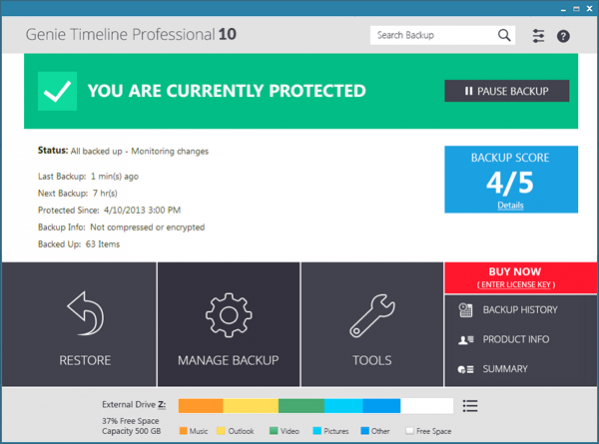
Genie Timeline 10 Professional Edition is a backup/restore tool with a stunning new metro style interface. Continuous update releases are available for the life time of the product to provide complete, seamless and reliable backups and restores. The new edition is faster, richer in features and easier to use. Timeline can backup a wide selection of data types twice as fast as the first edition and does not get in your way. Genie Timeline is lightweight and effortless. With a 3-step setup wizard, Timeline is ready to work on its own without any user intervention. Install, configure to your preference, and youre done! It seamlessly backs up your data in the background working as a parallel universe with computing history where deleted backed up files can be retrieved easily by a click of a button. With its intelligent Continuous Data Protection (CDP) the Timeline periodically creates backups of your files. Genie Timeline 2015 saves you time and space by using the Incremental Block Level new technology that backs up the changes made within the file. Genie Timeline also applies internal deduplication to eliminate mutiple copies of files stored on mutiple locations in the backup. Genie Timeline aims for your complete system protection; therefore, it intelligently recognizes backup drives on your machine so you can choose which drive to backup to. For extra convenience, you can just plug'n backup; without worrying if the drive letter changed, because Genie Timeline detects the backup location and resumes backup! You can easily get a clear picture and understand the details of what is being backed up with Genie Timeline's Backup Breakdown; an informative chart that displays the distribution of data types in the backup. Genie Timeline 2015 has some award winning features such as features such Disaster Recovery, encryption, schedule, file retention and much more.
About Genie Timeline Professional
This Backup & Restore program is available in English, Danish, French, German, Italian, Spanish. It was last updated on 29 September, 2026. Genie Timeline Professional is compatible with the following operating systems: Windows.
The company that develops Genie Timeline Professional is Genie9. The latest version released by its developer is 10.
The download we have available for Genie Timeline Professional has a file size of 13.6 MB. Just click the green Download button above to start the downloading process. The program is listed on our website since 2018-02-09 and was downloaded 0 times. We have already checked if the download link is safe, however for your own protection we recommend that you scan the downloaded software with your antivirus. Your antivirus may detect the Genie Timeline Professional as malware if the download link is broken.
How to install Genie Timeline Professional on your Windows device:
- Click on the Download button on our website. This will start the download from the website of the developer.
- Once the Genie Timeline Professional is downloaded click on it to start the setup process (assuming you are on a desktop computer).
- When the installation is finished you should be able to see and run the program.
Program Details
General
System requirements
Download information
Pricing
Version History
version 10
posted on 2018-02-09
Schedule, Backup Retention by Date, Internal Deduplication, 2x Faster, ability to limit the size of backup, New Disaster Recovery startup engine. 3 level protection status. The ability to control when turbo mode starts. Search older backups. Rename backup folder and append username and computername
version 2.1
posted on 2010-06-16
Disaster Recovery, Performance Modes, Windows Integration, Backup Markers, Backup Breakdown, Mobile Phone Support
Disclaimer
External Download
We do not host Genie Timeline Professional on our servers. We did not scan it for viruses, adware, spyware or other type of malware. This app is hosted by the software publisher and passed their terms and conditions to be listed there. We recommend caution when installing it.
The external download link for Genie Timeline Professional is provided to you by apps112.com without any warranties, representations or guarantees of any kind, so access it at your own risk.
If you have questions regarding this particular app contact the publisher directly. For questions about the functionalities of apps112.com contact us.
